

02The magic moment
Every track starts with a magic moment. CODA keeps it going.
The first hours on a new track, when you chase the idea without thinking. CODA takes the stops away so you stay in it.
Creative assistant for Ableton Live
Stay creative. Skip the setup.
You bring the idea. CODA clears everything between you and it: the digging, the routing, the setup. You stay in the music.
7 days free. Try it on your next idea.
Then USD 29 a month, founding price.
01Watch it work
Creatives need one of two things: organization or speed. CODA gives you both.
02The magic moment
The first hours on a new track, when you chase the idea without thinking. CODA takes the stops away so you stay in it.
03The stops
What stops you
Digging through folders for the right kick
Ask CODA
"Find a punchy kick in my library."
It lands on a new track to try.
What stops you
Clicking in drums one hit at a time
Ask CODA
"Build a groove in tech house with a four on the floor feel, with a kit you pick."
Keep it, change it, or Cmd+Z takes it back.
What stops you
Scrolling presets until the idea fades
Ask CODA
"Which of my plug-ins would work for a warm pad?"
It answers with plug-ins you already own.
What stops you
Worrying the mix is off and stopping to fix it
Ask CODA
"Check my low end."
It reads your meters and tells you, so you can decide now or later.
04What it reads
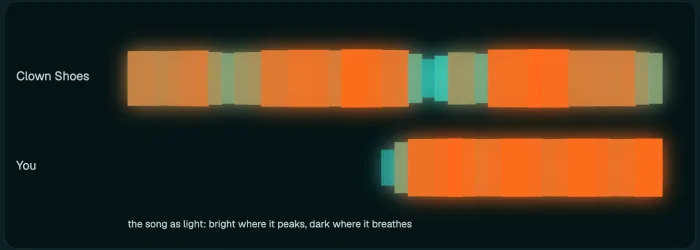
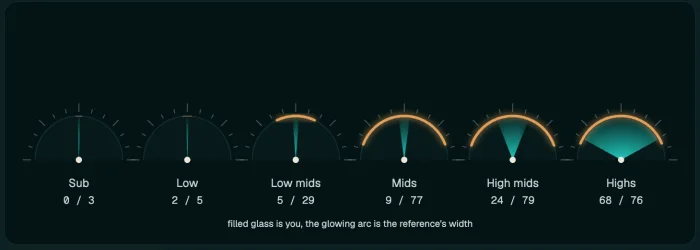
Drop a reference track on the window. CODA lays your track beside it and opens on the biggest gap: tonal balance, loudness, energy and stereo width.
Get feedback, balance tips, and mix improvements.

05Your setup
Other tools make the track for you and hand you their sound. CODA works with yours: your folders, your starred sounds, your plug-ins.
Before it writes a bassline, it asks which feel you want.
Chords on your racks. Samples from your folders. Presets on plug-ins you already own.
New parts land on new tracks. Keep it, or Cmd+Z takes it back.
CODA asks before it deletes anything you made.
06Why tracks don't get finished
Most unfinished tracks get stuck in one of five places.
07The cards
Nine cards cover the chores between a loop and a finished track.
Or start from a quick idea:Give me a track ideaTry a new genreStart from a reference
Get founding access08What we believe
We make music too. We've been there, opening the same unfinished project more times than we would like to admit. We get it.
The ideas show up fine. The session goes on setup: new tracks, racks, routing, and digging for the sample you know is in there somewhere.
Your taste is the part of the work nobody should take from you. Tools that make the track for you hand you their music. The music should be yours.
So we built a second pair of hands for the chores. It works in your set, with your sounds and the plug-ins you own. It asks the feel before it writes a note and shows the plan before it runs. You keep what you like.
09Who it is for
10Price
Founding access
USD29a month, founding price
USD 39 after the founding offer closes.
7 days freeCard at checkout. Charged on day 8, then monthly. We email you the day before your trial ends. Cancel during the trial and you pay nothing.
Top-up
Add-onUSD 10 one time
More room this month. Never expires while you stay subscribed.
11How it works
Get founding access. Your CODA key is on your welcome page in about a minute.
Run the installer. It checks Live and Max for Live for you, then puts CODA in your User Library.
Choose CODA as a control surface in Live, drag the CODA device onto the Main track and click CHAT. Tap a card or type the ask.
Mac only for now. macOS 12.3 or newer on Apple silicon, macOS 11 or newer on Intel. Ableton Live 12.4 or newer with Max for Live (Suite, or Standard with the Max for Live add-on). About 1.5 GB of free disk. Spend the session making music, not setting it up.
12FAQ
No. You make the music. CODA handles the work around it: finding sounds, setting things up, sketching starting points you can keep, change or ignore.
New parts go on new tracks, and nothing is deleted until you approve it. Smaller edits you ask for, like quantize, levels or a preset swap, happen right away, and Cmd+Z takes any change back.
Yes. It works with your library, your racks and the plug-ins you already own, plus Live's own devices.
It reads your set and Live's meters: tempo, key, tracks, devices and levels. It tells you what it measured. Your ears make the call.
macOS 12.3 or newer on Apple silicon, macOS 11 or newer on Intel. Ableton Live 12.4 or newer with Max for Live (Suite, or Standard with the Max for Live add-on). About 1.5 GB of free disk. You also need a connection while you use CODA. No Windows version yet.
The installer checks Live and Max for Live and stops with a plain message if something is missing. Then you pick CODA as a control surface and drag the CODA device onto your Main track.
On day 8 CODA charges your card USD 29 and the plan renews monthly. As a founding member, your price stays locked for as long as you stay subscribed. We email you the day before the trial ends.
Credits are how CODA counts use. An ask costs 1 credit and a generate costs 2 credits, and the app shows how many you have left. The 7 free days come with 100 credits. After that the founding plan includes 125 credits a month. Plan credits reset on the 1st of each month (UTC), and unused credits do not roll over. If an ask fails, its credits come back automatically. Need more in a busy month? A top-up adds 40 credits for USD 10.
From your account page: sign in with the email you used at checkout, press Manage billing or cancel, and confirm. Cancel during the trial and you pay nothing.
Yes. The parts CODA writes are ordinary clips and tracks in your Live set, so they stay.
Email support@getcoda.tech. We read every message and answer as fast as we can.
Quinn and Bryan, two producers in Tampa and St. Petersburg.
13Founding access
Start your 7 free days and see how far one session gets you.
We make music too. CODA is for producers who start more tracks than they finish.
7 days free, then USD 29 a month, founding price. Cancel any time.
Back to the music.